Showing posts with label Apple. Show all posts

Tuesday, 3 June 2014

WWDC 2014 yes, OMG

So yesterday Apple had its Developer Keynote, and for the first time since Steve's passing, I am full of hope. To me, Apple was more than just its hardware and software, it's more about the way it's able to mesh the two together in a seamless way. To me, this way the core driving feature that's been missing since Steve. Maybe not missing per se, but it no longer looked like this was a core factor in it's development.

However, I am by far no expert, and I AM definitely a fan boy. Apple is one of those companies that I love, and yes, I do see that they can mess things up (for example iCloud). If a company makes ten decisions and gets two wrong, and still manages to make a billion, okay, I can forgive that. However let's get into why this keynote was such a big win for me and by me I mean me.


Let's start with iCloud:
Now iCloud, as far as a normal iPhone user is concerned, comes down to an iPhone back-up and photo storage. Apple starts you off with 5GB, and we all know that there's very little we can do with that. If the smallest iPhone starts at 16GB, after a few months you can't back-up your phone at all. (udated: as i was reminder by one of my readers +Jefferson Edwards , the 15GB plan will back up a16GB iPhone as 2+GB is taking up for the IOS, this part of the drive is not not backed upped to iCloud. thanks jeff)  Now you can upgrade to the first paid plan with its 10GB @ $20/year and then 15GB for $20/year. Now why Apple would choose to go with 15 and not 16, I don't know, but one can speculate , that this is where Dropbox and others like it come into play. Now the real world application of iCloud storage, that is the same size of your phone means that if anythings ever happens to your phone, you will get it back the same way you last left it. If you buy a new phone, you can now setup that iPhone with everything the old phone had, and all this with one click, and with the user non the wiser, because it works in the back ground and the user don't even have to know how or why. Now you may say, so what, I can re-download my apps, if I use iTunes music I can re-download the music, but photos can't be re-downloaded. This is one of those things that if you don't back up you will never get back. You can use Google and/or Flickr. but you miss that "integration". and this is what Apple wants you to buy into. Now think of this, you add your desktop mac and ipad to the mix; you are now "forced" to back up the devices to the desktop. Now we know as "real" mac users, we don't want to DO anything; we believe that it should just be done for us because this is how things work in the Apple world. All my devices should be up- to-date, and backed up without my having to look at it and i buy a other device and i sign in, i just want my stuff to be there.


This is what the new iCloud storage will bring to us. Apple has added iCloud Disk. Now all will TRULY be in sync with each other. Apple stills starts off at 5GB for free, but let us compare the new pricing.

Dropbox @ Free: 2GB, $10/month: 100GB, $20/month: 200GB $40/month: 500GB
Google Drive @ Free: 15GB, $2/month: 100GB, $10/month: 1TB
iCloud Drive @ Free: 5GB, $1/month: 20GB, $4/month: 200GB
iCloud @ Free 5GB,
$1.66/month: 10GB, $3.33/month: 20GB, $8.33/month: 20GB


So if you are already someone who pays for the seamless life, this will prove to be a big upgrade, should it work; it will be what iDisk was promised and what Dropbox is. All you devices, with all your files, and you don't even have to think about it.


The next big thing "Health" and "Healthkit"
Where to start...
So I like going to the gym, but I LOVE going to the gym with my iPhone. Why? Cuz there is an App for the gym machines, I can play out a workout at home; walk into the gym, plug in and start, how cool is that?! I love Nike running shoes, guess what? There is an app for that too! I go running, the app knows how far, number of steps, and all the other relevant health stuff. I have a blood pressure unit, and yes, there is an app for that, when I take my blood pressure, it knows. Now, let's say you have seven odd devices that know things about your well being, yes, that's good, but now Apple comes and says, you know, you don't have to read from the seven apps you have in order to know what's going on with you, why not just take this one app, and tell your other apps to feed it the information. Do you understand what just happened there?... It's like the Hobbit all over... the best thing about these, for the people with other devices, the manufacturers can still build their devices to other platforms, nothing is "forced" on anyone. All Apple is saying is build your devices, build your apps, and we will have this app on the sideline that will pull it all together. So it does not matter to Apple who the maker of the device is, once there is an IOS app for it, we are happy. This opens the door to any player.
Have a read from 9to5mac. This brings us to Homekit.


Homekit...

Homekit...
Now this is what I've been waiting for. Let me restart.
Drives up to my gate, "Hi Siri, I am home with one guest car."
The drive bay for my car opens, along with the bay for the guest car, because I fix cars, and I have an area for them. Because, I don't use the front door when I have a guest car, the side door unlocks. Now before any of this happens, I have to use touchID; the AC comes on, and the GE small fridge, drops the temperature 15 degrees for when I offer my guest a cold coke.
Not too long after, my wife comes home with the kids. As she enters the yard, the front door unlocks, the AC in the bedrooms turn on, and the water heater turns on. And that people, is just for starters. My word, I hope Apple does right by this. Just like Health, there are 100's of apps which offer to control some devices, but again, what we are missing now is the integration, and this is what Apple is looking to do. Let the manufacturers do what they do best, we trust that Apple will just tie it all in.
This is what Apple says in its site:

"Home Kit provides seamless integration between accessories that support Apple's Home Automation Protocol and iOS devices, allowing for new advances in home automation. By promoting a common protocol for home automation devices and making a public API available for configuring and communicating with those devices, Home Kit makes possible a marketplace where the app a user controls their home with doesn’t have to be created by the vendor who made their home automation accessories, and where home automation accessories from multiple vendors can all be integrated into a single coherent whole without those vendors having to coordinate directly with each other.
  • Home Kit allows third-party apps to perform three major functions: 
  • Discover accessories and add them to a persistent, cross-device home configuration database. 
  • Display, edit, and act upon the data in the home configuration database. 
  • Communicate with configured accessories and services to get them to perform actions, such as turning on the lights in the living room." 


Some things that already work:

Netatmo Weather Station


Haier Tianzun Smart Air Conditioner

Honeywell Wi-Fi Smart Thermostat

Philips hue -- Personal Wireless Lighting


August Smart Lock


No I am not done...
Continuity... Now if nothing else works in the set, being able to answer my iPhone from any other IOS device. Too Long.. Too Long... Take my money Apple. Again this is talking to the person that is quite literally, a part of the Apple lifestyle. Everything thing just works... Only, being able to move from the Desktop to the iPad to the iPhone... love it! That is something you should expect from Apple Products. That is they flow seamlessly into one another.

Now you need to understand that they is one fundamental, background here, that is Trust, people that use apple products, really do trust them. So when you pass your figure over the TouchID you KNOW that no one but the phone knows that it you, not even Apple. So people know that when they have all this data synced, it is with that trust in mind that no one else other than who you say can see the information, is really that.

Again these are the main things for me, i don't know how our local banks will handle TouchID for or when they do make the move to iPhone apps. Metal for gaming, that to me is icing on the cake. the new programming language, Swift, if this works like it should, this is bring a younger generation, into programming, more so if Apple makes its push into the education market. nothing beats "writing code" and seeing what it does as you write it.

Ahhhhhh one more thing...
Family Sharing... this like when Netflix give us "profiles". as it is now, My son, my wife and i and are the main users. i am two accounts, one US that i use gift cards with and one local that is linked with apple and my CC. Now, my son needs to try every app, i mean really, my wife, i don;t understand, she never goes into the app store, so i am guesting that it must be my son. Now i no longer have automatic downloads on because i would have 10 free apps every week, that i never picked. Music, my wife love music, now if you know my wife she is more black than me, the first thing she would download is 2pac, now we have 3 kids, Dear mama, can only play that number of times. so now that every one can share music books movies or download their own and have their own profile, all i need to do is approve stuff when someone tries to buy something. I really really like that. 
http://www.apple.com/ios/ios8/family-sharing/

Some quick links:
MacBreak Weekly 405
Apple IOS 8 Preveiw
Apple Swift

"Hi Siri you may now prepare my bath"

Sunday, 18 September 2011

NetFlix, iPad/iPhone Trindad...

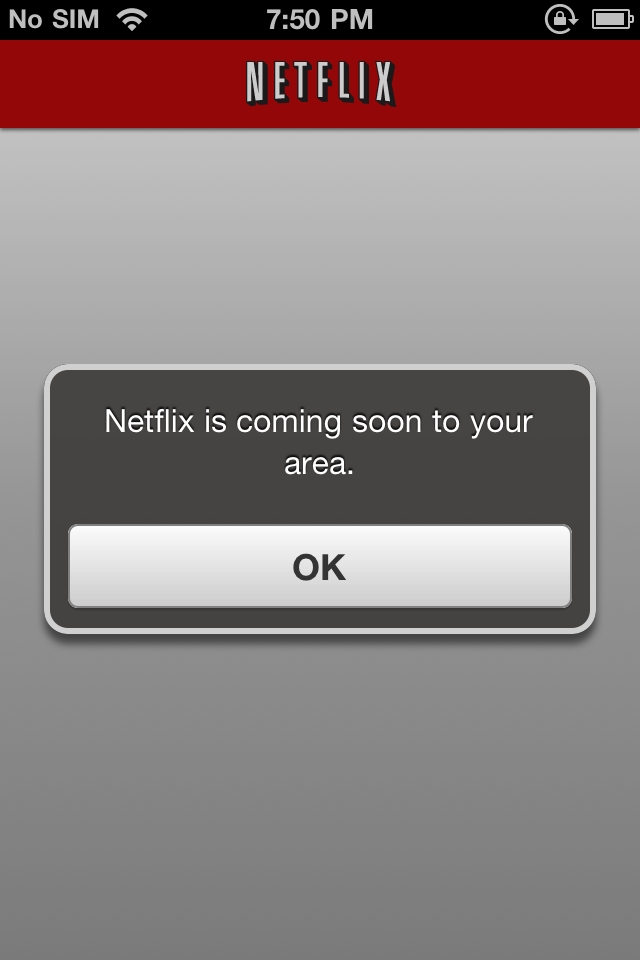
Let me start off by saying that Netflix is now available in Trinidad. I am not happy, not happy at all. I am so unhappy, I must be living before my time...
So, we here in Trinidad now have Netflix, and if you are less than 7 years old then you can be happy, because as far as i see, there's a lot of content for the kids.
OK, that is one good, but for me, 40% of it is not there.  It's a good thing that I like looking at older movies, because a good bit of them are there. But let's move on from that and get to the point at hand.

Netflix: the app, is free and it is a small download
So you the normal thing when you download your apps, you sort...
Nice, all is going well...
let's open her up...
Spanish...? Hopefully, they will let me change this, or it may just be the LogIn...
After log in
Very nice English... :)
So let's see my listing for F&F
 You know I'm mad now.  So, where's the other two from my US account?  Note, this is how I found out abut the missing content, I really did not think it was going to be this bad. This is the point where I started looking to see what there was for the kids, and I was 70% happy with it, so in my mind, okay, they can use it on the new Apple tv when it gets here..
So let me see how things are looking.
What the hell...
NO really
What the hell...
Clearly I am missing something...
Yes???
I must, right?
So I'm pulling out the iPhone at this point ...


The same thing...
So what?
Tell me...
Waits on Apple TV
and Back to Boxee...
We will continue this later...
 and if you still don't know why I am vex, let me spell it out for you.
Netflix on the iPad and iPhone not working...
updates...
Some of you have been asking for the firmware...
the iPad is on 4.3.5
the iPhone is on 4.3.3
and the app is 1.4.0 build 930547

20/9/2011 update
I opened the app to see...
Yes... :) Good move...

Wednesday, 20 July 2011

Boxee vs AppleTV (G1)

So you all know I am I big apply fan boy, but thanks to my buddy Khemchandra Persadsingh , he give me his Boxee Box for a weekend, yes, last weekend and i can't give it back. No, really, i can't my kids where using it the same day. i didn't have to show them a thing and the iPhone remote worked the same. All the tv shows that i have in my FreeNAS looked so much better. Now i have a Hacked AppleTV that is running Boxee, and it does need restarting ever so often while i did not have to do a thing with the Boxee Box. The Apple TVs shows tv shows and movies from iTunes just as good, but 90% of my content is downloads, so it wins hands down. My only downs right now are the Load time for shows, it is twice as long as the AppleTV and using the remote at night, you can't see the keyboard and that is it.
Now i need to really compere this to the new AppleTV that i was sure that i was going to buy, until the Boxee Box get here.
Thinking about it now, i really need to compare a Boxee Box, Apple TV (G2) PlayStation 3 and Web enable TV. But for now, if you don't have a PlayStation 3 and in the market for a set top box, really think about getting a Boxee Box.
I will have to end this review short as i don't feel like i have all the facts to hand to you. So consisder this my preview.
Later ppl

Sunday, 17 July 2011

New iMacs are here and with Thunderbolt

Apple released their new iMacs this week adding the new Thunderbolt Port. What is Thunderbolt? We will get to that, but first a quick look at the specs of these new computers.

Starting from the Low end, we have:

iMac 21

Screen
  • 21.5-inch (viewable) LED-backlit glossy widescreen TFT display with support for millions of colors
  • Resolution: 1920 by 1080 pixel
Processor
  • 2.5GHz quad-core Intel Core i5 with 6MB on-chip shared L3 cache

Memory

  • 4GB (two 2GB) of 1333MHz DDR3 memory Configurable to 8GB
Hard hard
  • 500GB (7200 rpm) hard drive

Graphics

  • AMD Radeon HD 6750M graphics processor with 512MB of GDDR5 memory

On the High-end

 iMac 27

Screen

  • 27-inch (viewable) LED-backlit glossy widescreen TFT display with support for millions of colors
  • Resolution: 2560 by 1440 pixels

Processor

  • 3.1GHz quad-core Intel Core i5 with 6MB on-chip shared L3 cache

Memory

  • 4GB (two 2GB) of 1333MHz DDR3 memory Configurable to 16GB
 HardDrive
  • 1TB (7200 rpm) hard drive Configurable to 2TB hard drive or 256GB solid-state

 Graphics
  • AMD Radeon HD 6970M graphics processor with 1GB of GDDR5 memory
Configurable to AMD Radeon HD 6970M with 2GB GDDR5

All carry

Video Support and Camera

  • FaceTime HD camera
  • Simultaneously supports full native resolution on the built-in display and up to a 30-inch display (2560 by 1600 pixels) on an external display
  • Support for extended desktop and video mirroring modes
Audio
  • Built-in stereo speakers
  • Two internal 20-watt high-efficiency amplifiers
  • Headphone/optical digital audio output (minijack)
  • Audio line in/optical digital audio input (minijack)
  • Built-in microphone
  • Support for Apple iPhone headset with microphone
Connections


  • One Thunderbolt port on 21.5-inch iMac
  • Two Thunderbolt ports on 27-inch iMac
  • Mini DisplayPort output with support for DVI, VGA, and dual-link DVI (adapters sold separately)
  • One FireWire 800 port; 7 watts
  • Four USB 2.0 ports
  • SDXC card slot
  • Slot-loading 8x SuperDrive with 4x double-layer burning (DVD±R DL/DVD±RW/CD-RW)
  • Audio in/out
  • 10/100/1000BASE-T Gigabit Ethernet (RJ-45 connector)
  • IR receiver

Wi-Fi

  • 802.11n Wi-Fi wireless networking;2 IEEE 802.11a/b/g compatible

Bluetooth

  • Bluetooth 2.1 + EDR (Enhanced Data Rate) wireless technology

Input
  • Apple Wireless Keyboard: Full-size keyboard with 78 (U.S.) or 79 (ISO) keys, including 12 function keys, 4 arrow keys (inverted “T” arrangement)

Magic Mouse
Smooth, seamless Multi-Touch surface with support for simple gestures (scrolling and swiping). Click and double-click anywhere. Ambidextrous construction accommodates left- and right-handed users.

and or

Magic Trackpad
Solid-state scrolling trackpad for precise cursor control; supports inertial scrolling, pinch and expand, swipe, three-finger swipe, four-finger swipe, tap, double-tap, rotate, screen zoom, scroll, click and drag, click drag and lock, secondary click A and B

Starting Price tag  1199 US for the low-end and 1999 for the high-end


Now Thunderbolt (originally codenamed Light Peak) is an interface for connecting peripheral devices to a computer via an expansion bus. Thunderbolt was developed by Intel and brought to market with technical collaboration from Apple. Thunderbolt essentially combines PCI Express and DisplayPort into a new serial data interface that can be carried over longer and less costly cables. The interface was originally intended to run on an optical physical layer using components and flexible optical fiber cabling. However, conventional copper wiring turned out to be able to furnish the desired 10 Gb/s Thunderbolt bandwidth at lower cost. Later versions of Thunderbolt are still planned to introduce an optical physical layer based on Intel silicon photonics technology.
Seeing that Thunderbolt is based on PCI Express technology, Intel/Apple can use existing USB and FireWire peripherals — even connect to Gigabit Ethernet and Fibre Channel networks — using simple adapters. And because Thunderbolt is based on DisplayPort technology, the video standard for high-resolution displays, any Mini DisplayPort display plugs right into the Thunderbolt port. To connect a DisplayPort, DVI, HDMI, or VGA display, just use an existing adapter.

How does Thunderbolt stack against the rest?

You may have realized Apple does not carry USB 3.0 Ports and therefore hopes on the forward movement of Thunderbolt as the new Hi-Speed interface standard.

Thunderbolt-ready devices.

Storage

Video Capture

Adapters

  • Promise SAN Link Fibre Channel adapter
  • Sonnet Allegro FireWire 800 adapter
  • Sonnet Presto Gigabit Ethernet adapter
Some quick specs of Thunderbolt
  • Dual-channel 10 Gbps per port
  • Bi-directional
  • Dual-protocol (PCI Express* and DisplayPort*)
  • Compatible with existing DisplayPort devices
  • Daisy-chained devices
  • Electrical or optical cables
  • Low latency with highly accurate time synchronization
  • Uses native protocol software drivers
  • Power over cable for bus-powered devices

Some early tests done by Apple

Using the Promise Pegasus R6 RAID Drive these where the Read/Write Speeds
And using the same drive these where the number of 720p streams that where possible using Thunderbolt.
Early Demo of Thunderbolt on a MacBook Pro with a raid drive and a second Monitor


So what does Thunderbolt mean for me Today as a "normal' user... Nothing... I have not been a USB fan for hi-speed connects, and Firewire works very well for me when i have to connect my video camera or when connenting external Hard Drives. But i am very happy to know that the day in which i need to connect a second Monitor, back-up my iPhoto library (now at 420GB) or connect to some upcoming cool up and coming gear (all one one port), I already have that port siting there waiting.
As a "PowerUser" I can see no disadvantages in not using this port, even today, as two of my past-times are Photography and Video, working from home means there is a limit to number of devices i can put on my desk. We always need/want faster drives, and a second monitor is always a good thing to have. Being able to have these simple wants over "one cable" is a big plus. This means, Firewire camera to the Raid Drive to a (HDMI) 34' Sony and then to a iMac all on "one cable". Come on... And that is just the start and things to come.
I have always been a Power User, meaning that i always had to buy PowerMacs, but this line of computers have truly have moved me to really consider being a iMac user and not because of price, but because of performance. Starting at i5 4GB of RAM, Sandy Bridge and Thunderbolt @ $7000TT, that is a very easy sell for me.